
Streaming New Tables with Debezium on AWS MSK Connect
Introduction
If you’re working with Debezium on MSK Connect and continuously evolving your database schema, you’ve probably faced the challenge of adding new tables to an already running pipeline.
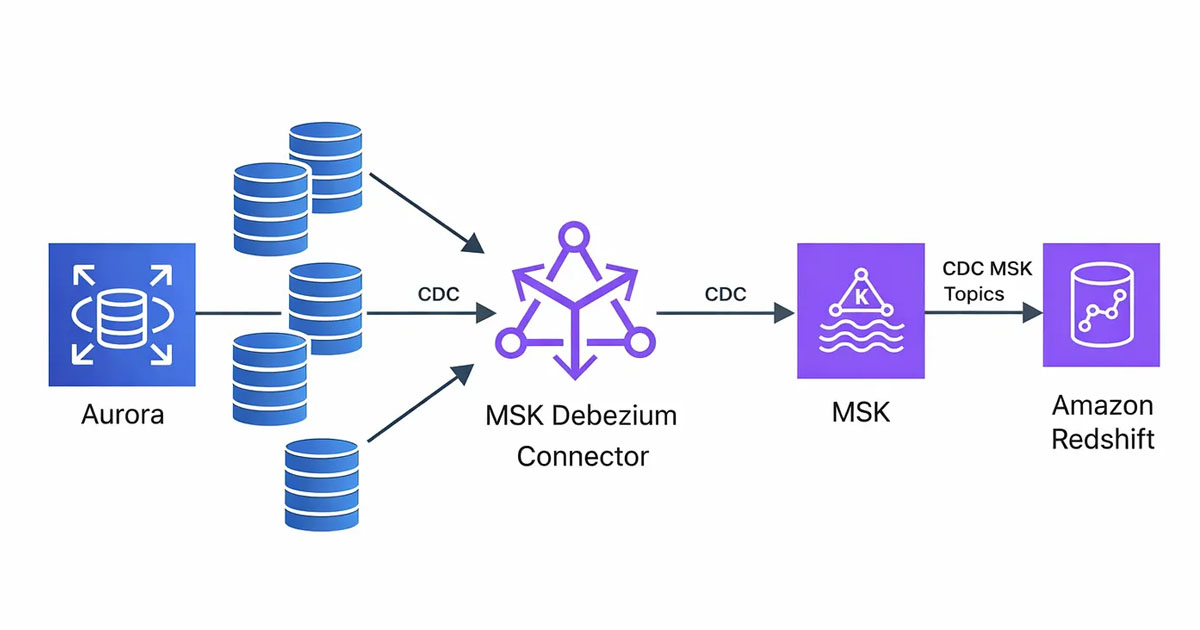
In my current setup, I stream data from MySQL tables into Amazon Redshift using Debezium CDC running on AWS MSK Connect, with Amazon MSK as the streaming backbone. Debezium captures binlog changes from MySQL, publishes them to Kafka topics in MSK, and Redshift consumes those streams for near real-time ingestion.

Streaming new tables with Debezium on AWS MSK Connect sounds simple — until you realize that adding a table to table.include.list does not backfill existing data.
Debezium captures changes from the binlog. If the connector was already running, snapshot.mode = "initial" has already executed. Any table added later will stream only new changes, leaving historical data untouched. The result is incomplete Kafka topics and downstream systems missing critical records.
In this article, I’ll walk you thorugh the approach to backfilling new tables using Debezium 3.1.2 incremental snapshots with database-based signaling.
The Problem
When using Debezium 3.1.2 with AWS MSK Connect, adding new tables to your table.include.list creates an immediate challenge: Debezium only captures changes that happen AFTER the table is added. All existing data in the table remains unstreamed.
This happens because:
- Debezium’s
snapshot.mode = "initial"only runs once when the connector is first created - Adding tables later bypasses the snapshot phase entirely
- Only new CDC (Change Data Capture) events from the binlog are captured
The result: Kafka topics remain empty or incomplete, missing all historical data from the newly added table.
Other Approaches I Tried (Not Practical)
Before finding the right solution, I explored two alternatives that did not work well.
Reinitializing the Connector
Restarting the connector would re-trigger the snapshot, but it stops all streams and causes downtime for every table — not just the new one.
Kafka Signaling Channel
I also tested Kafka-based signaling, but it required additional IAM setup and ran into MSK IAM handshake timeout issues. It introduced unnecessary complexity for this use case.
The Solution: Database-Based Signaling with Incremental Snapshots
Debezium 3.1.2 provides a Source Signaling Channel that uses the existing MySQL connection to trigger incremental snapshots. This turned out to be the most reliable approach for AWS MSK Connect deployments.
How It Works
- I create a dedicated
debezium_signalstable in MySQL - I configure Debezium to monitor this table for signal records
- I insert a signal record to trigger a snapshot for a specific table
- Debezium performs a background scan in chunks (no table locking)
- It uses watermarking to ensure no data loss while streaming continues
Prerequisites
Before implementing this solution, ensure:
- MySQL Database Access: You need admin/root access to create the signaling table and grant permissions
- Debezium User Permissions: The Debezium user needs
SELECT, INSERT, UPDATE, DELETEon the signaling table - You need to update MSK Connect connector configuration
Implementation Steps
Step 1: Create the MySQL Signaling Table (One-Time Setup)
Connect to your MySQL database as an admin user — or ask the DB admin to do it — and run:
-- Create the signaling table
CREATE TABLE IF NOT EXISTS schema_name.debezium_signals (
    id VARCHAR(255) PRIMARY KEY,
    type VARCHAR(255) NOT NULL,
    data VARCHAR(2048) NULL
);
-- Grant permissions to Debezium user
GRANT SELECT, INSERT, UPDATE, DELETE ON schema_name.debezium_signals TO 'debezium'@'%';
FLUSH PRIVILEGES;
Important Notes:
- This is a one-time setup — you only need one signaling table per connector
- The table works for ALL schemas and tables your connector monitors
- Debezium uses this table internally for watermarking during snapshots
Step 2: Configure Debezium for Source Signaling
Update the MSK Configuration, and since I am using IaC to provision the resources, I update the Terraform MSK Connect file to include the new configuration (terraform/msk_connect.tf):
connector_configuration = {
  # Basic connector settings
  "connector.class"        = "io.debezium.connector.mysql.MySqlConnector"
  "tasks.max"              = "1"
  "include.schema.changes" = "false"

  # Database connection
  "database.hostname"      = var.existing_aurora_cluster_endpoint
  "database.port"          = "3306"
  "database.user"          = "debezium"  # Your Debezium user
  "database.password"      = "***"       # From secrets
  "database.server.id"     = "154011"    # Unique server ID
  "database.server.name"   = "schema_name"  # Logical name (used as topic prefix)

  # Table and database filtering
  "table.include.list"    = "schema_name.table1,schema_name.table2,..."
  "database.include.list" = "schema_name"

  # Data format
  "topic.prefix"           = "schema_name"
  "value.converter"        = "org.apache.kafka.connect.json.JsonConverter"
  "key.converter"          = "org.apache.kafka.connect.storage.StringConverter"
  "key.converter.schemas.enable"   = "false"
  "value.converter.schemas.enable" = "false"
  "decimal.handling.mode"  = "string"

  # Schema history (required for Debezium)
  "schema.history.internal.kafka.topic"             = "internal.dbhistory.schema_name"
  "schema.history.internal.kafka.bootstrap.servers" = aws_msk_cluster.this.bootstrap_brokers_sasl_iam
  "schema.history.internal.skip.unparseable.ddl"    = "true"

  # Schema history IAM authentication
  "schema.history.internal.producer.sasl.mechanism"                     = "AWS_MSK_IAM"
  "schema.history.internal.consumer.sasl.mechanism"                     = "AWS_MSK_IAM"
  "schema.history.internal.producer.sasl.jaas.config"                   = "software.amazon.msk.auth.iam.IAMLoginModule required;"
  "schema.history.internal.consumer.sasl.jaas.config"                   = "software.amazon.msk.auth.iam.IAMLoginModule required;"
  "schema.history.internal.producer.sasl.client.callback.handler.class" = "software.amazon.msk.auth.iam.IAMClientCallbackHandler"
  "schema.history.internal.consumer.sasl.client.callback.handler.class" = "software.amazon.msk.auth.iam.IAMClientCallbackHandler"
  "schema.history.internal.consumer.security.protocol"                  = "SASL_SSL"
  "schema.history.internal.producer.security.protocol"                  = "SASL_SSL"

  # Snapshot mode
  "snapshot.mode" = "initial"

  # Topic creation settings
  "topic.creation.enable"                     = "true"
  "topic.creation.default.replication.factor" = "3"
  "topic.creation.default.partitions"         = "1"

  # Error logging
  "errors.log.enable"           = "true"
  "errors.log.include.messages" = "true"

  # === SOURCE SIGNALING CONFIGURATION ===
  "signal.data.collection"  = "schema_name.debezium_signals"
  "signal.enabled.channels" = "source"
}
Key Configuration Notes:
signal.data.collection: Points to the MySQL table Debezium monitors for signalssignal.enabled.channels = "source": Enables database-based signaling (uses existing MySQL connection)database.server.name: This becomes your Kafka topic prefix (e.g.,schema_name.schema_name.table1)- Schema history settings: Required for MSK IAM authentication — these allow Debezium to track DDL changes
Important: I use "source" only (not "source,kafka") because the Kafka signaling channel has IAM authentication timeout issues with MSK Connect.
Step 3: Apply Terraform Changes
cd terraform
terraform apply
Wait for the MSK Connect connector to update (typically 2–5 minutes). The connector will restart with the new configuration.
Step 4: Add New Table to Debezium
Update table.include.list to add the new table to Debezium
  # ... other configs ...

  "table.include.list" = "schema_name.orders,schema_name.users,schema_name.YOUR_NEW_TABLE"

  # ... other configs ...
Run terraform apply again:
terraform apply
At this point: Debezium knows about your new table but has NOT captured existing data yet.
Step 5: Trigger the Incremental Snapshot
Connect to your MySQL database and insert a signal record:
INSERT INTO schema_name.debezium_signals (id, type, data)
VALUES (
  'backfill-YOUR_NEW_TABLE-001',  -- Unique ID for this snapshot
  'execute-snapshot',
  '{"data-collections": ["schema_name.YOUR_NEW_TABLE"], "type": "INCREMENTAL"}'
);
Example for trips table:
INSERT INTO schema_name.debezium_signals (id, type, data)
VALUES (
  'backfill-trips-001',
  'execute-snapshot',
  '{"data-collections": ["schema_name.trips"], "type": "INCREMENTAL"}'
);
Important:
- Replace
YOUR_NEW_TABLEwith your actual table name - Use a unique
idfor each snapshot request (helps with debugging) - Use the fully-qualified table name:
database.table
Verification & Monitoring
Immediate Verification
Check AWS CloudWatch Logs for your MSK Connect connector. based on the table size, within few seconds to minutes, you should see:
INFO Signal condition met for signal 'backfill-YOUR_NEW_TABLE-001'
INFO Scanning for incremental snapshot of table 'schema_name.YOUR_NEW_TABLE' started
INFO Step 1 - Snapshotting table 'schema_name.YOUR_NEW_TABLE' [1 of 1]
Monitoring Progress
1. Check Kafka Topic for Data:
Data will start appearing in the related Kafka topic almost immediately:
# Topic name format: database_name.schema_name.table_name
# Example: schema_name.schema_name.YOUR_NEW_TABLE
In my current setup, I access MSK via Bastion host, where I can list the topics and see the CDC flow for any one of them.
2. Check the Signal Table:
SELECT COUNT(*) FROM schema_name.debezium_signals;
You’ll see the count growing rapidly. This is NORMAL. Example output:
count(*): 413
What’s happening: Debezium is inserting watermark records (snapshot-window-open and snapshot-window-close) to track its progress through the table. This is how it ensures data consistency without locking your table.
Completion Signal
CloudWatch Logs will show:
INFO Incremental snapshot for table 'schema_name.YOUR_NEW_TABLE' completed
I used this CloudWatch Log Insights query to query MKS Connector logs:
fields @timestamp, @message
| filter @message like "Incremental snapshot"
| sort @timestamp desc
| limit 25
Signal Table: The record count will stop growing once the snapshot is complete.
Verify Data in Redshift
Once the snapshot completes and Redshift streaming ingestion processes the data:
1. Check Row Count in MySQL:
SELECT COUNT(*) FROM schema_name.YOUR_NEW_TABLE;
2. Check Row Count in Redshift:
SELECT COUNT(*) FROM streaming_schema.YOUR_NEW_TABLE;
Expected Result: The counts should match (or Redshift count will be slightly behind during active streaming). This confirms the full historical data has been backfilled successfully!
Understanding Watermark Records
After triggering a snapshot, you’ll see many records in debezium_signals:
SELECT * FROM schema_name.debezium_signals LIMIT 5;
-- Example output:
id: 0054f548-10a3-4b86-9634-753000b66a4a-open
type: snapshot-window-open
data: {"openWindowTimestamp": "2026-03-02T15:29:39.746806395Z"}id: 0054f548-10a3-4b86-9634-753000b66a4a-close
type: snapshot-window-close
data: {"openWindowTimestamp": "2026-03-02T15:29:39.746806395Z", "closeWindowTimestamp": "2026-03-02T15:29:39.839449316Z"}
What these mean:
- snapshot-window-open: Marks the start of reading a chunk of rows. Records the binlog position.
- Reading chunk: Debezium queries a batch of rows from your table
- snapshot-window-close: Marks the end of the chunk read
By comparing the binlog position at open/close, Debezium detects if any rows were updated during the read. If changes occurred, it uses the binlog version (newest data) to ensure accuracy.
This is normal behavior and is how Debezium achieves zero downtime backfills.
Cleanup After Completion
Once the snapshot is complete, you can clean up the watermark records:
DELETE FROM senpex_vers3.debezium_signals WHERE id IS NOT NULL;
Or use TRUNCATE — if you have permissions to do so:
TRUNCATE TABLE senpex_vers3.debezium_signals;
Note: Only clean up AFTER the snapshot is confirmed complete via CloudWatch logs.
Key Benefits of This Approach
- Zero Downtime: Existing table streams continue uninterrupted
- No Table Locking: Incremental snapshots use SELECT queries, not table locks
- Repeatable Process: Add as many tables as needed using the same workflow
- Production Safe: Watermarking ensures data consistency even with concurrent updates
- MSK Connect Compatible: Uses existing MySQL connection (no Kafka consumer complexity)
Conclusion
Using database-based signaling with incremental snapshots allows me to backfill new tables safely, without downtime or connector restarts. It keeps existing streams intact while ensuring historical data is fully captured.
This approach is repeatable, production-safe, and well-suited for MSK Connect deployments where new tables are added over time.
Author
Noor Sabahi | Senior AI & Cloud Engineer | AWS Ambassador
#Debezium #msk #awsAmbassador #Redshift #dataStreaming #CDC #Kafka