
Introduction
When I started building multi-agent systems on AgentCore, I quickly hit a problem that had nothing to do with the agents themselves: how do you control the visibility of deployed tools and MCP servers? Every target registered in AgentCore Gateway needed to be discoverable only when it was ready — but Gateway has no native way to disable a target without deleting its related record. To work around this, I built a UI on top of AgentCore Gateway that allowed adding and removing target records on demand. It worked, but it was friction — deletion is destructive, what I really wanted was a disable toggle that didn’t exist.
When AWS Agent Registry appeared I was genuinely excited to experiment with it and explore the role it plays in AgentCore ecosystem. My honest feedback and observations on what could be improved are at the end of this article.
What is AWS Agent Registry?
AWS Agent Registry, part of Amazon Bedrock AgentCore, gives platform teams a centralized catalog to organize, govern, and share AI agents, MCP servers, agent skills, and custom resources across the organization.
This article explains the core concepts and how they fit together, based on the official AWS Labs tutorials at awslabs/agentcore-samples.
Minimum SDK version: boto3 >= 1.42.87
How AWS Agent Registry Works
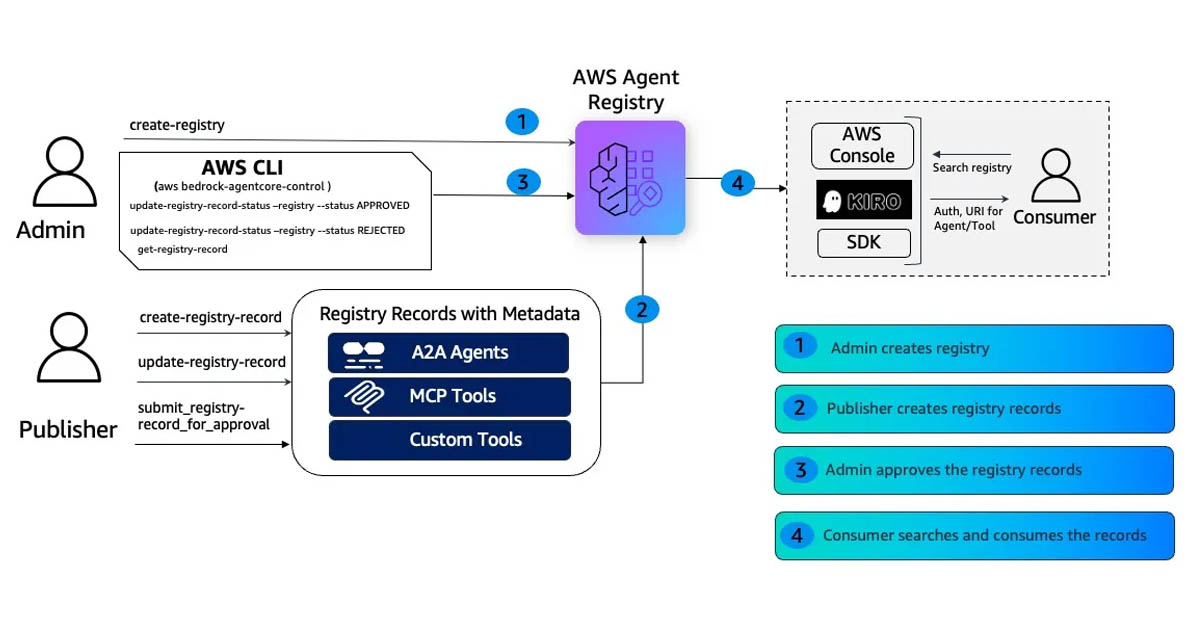
The Registry is a governed catalog. Nothing becomes discoverable without passing through an approval workflow. The flow is:

There are three main personas
- An Admin creates a registry
- A Publisher registers agents and tools as records (all start as
DRAFT) - The Publisher submits records for review
- The Admin approves or rejects
- A Consumer searches and discovers only what has been approved
That last point matters: search only returns APPROVED records. A record in DRAFT or PENDING_APPROVAL is invisible to consumers. The approval gate is the whole point.
The three personas (Admin, Publisher, Consumer) are plain IAM users or roles with scoped policies. There is nothing special about them in the Registry itself — it’s pure IAM enforcement. The critical boundary is a single IAM action: UpdateRegistryRecordStatus. Only the Admin policy includes it. This is what prevents a Publisher from approving their own work.
AWS Agent Registry Record Types Explained
A record is the unit of publication. Every record carries a descriptors block — the connection metadata a consumer needs at runtime — plus a name, description, and version that are indexed for search.
The Registry supports four types. Choosing the right one depends on what you’re publishing and how consumers will use it:

Each record starts in DRAFT after creation and must be approved before it appears in search:
Press enter or click to view image in full size

AWS Agent Registry MCP Record
An MCP record describes a Model Context Protocol server. It has two parts: a server descriptor (installation details — typically an npm package with a stdio transport) and a tools descriptor (the list of tool schemas the server exposes). Both are stored as JSON strings inside inlineContent.
The tools block is what gives MCP records their precision: each tool has an explicit inputSchema, so the consumer knows exactly what parameters to pass and can select which tool to call.
cp_client.create_registry_record(
    registryId=REGISTRY_ID,
    name="enterprise_code_review_mcp",
    descriptorType="MCP",
    descriptors={
        "mcp": {
            "server": {"inlineContent": json.dumps({
                "name": "io.enterprise/code-review",
                "version": "2.1.0",
                "packages": [{"registryType": "npm", "identifier": "@enterprise/code-review-mcp",
                              "version": "2.1.0", "transport": {"type": "stdio"}}]
            })},
            "tools": {"inlineContent": json.dumps({
                "tools": [{"name": "review_code", "description": "Analyze code for security issues",
                           "inputSchema": {"type": "object", "properties": {"code": {"type": "string"}}}}]
            })}
        }
    },
    recordVersion="2.1",
)
AWS Agent Registry A2A Record
An A2A record carries an agent card — the A2A protocol’s standard self-description. The most important field inside the agent card is url: the endpoint where the consumer sends tasks.
The skills array is where A2A differs fundamentally from MCP. Skills are natural-language descriptions of what the agent can do — they exist for discoverability, not for invocation. There is no input schema, no tool selection. The consumer sends a free-form task to the agent’s url, and the agent decides internally which capability to invoke. Think of skills as the catalog description, not the API contract.
cp_client.create_registry_record(
    registryId=REGISTRY_ID,
    name="enterprise_compliance_agent",
    descriptorType="A2A",
    descriptors={
        "a2a": {
            "agentCard": {
                "schemaVersion": "0.3",
                "inlineContent": json.dumps({
                    "protocolVersion": "0.3",
                    "name": "enterprise-compliance-agent",
                    "url": "https://compliance-agent.internal.example.com/a2a",
                    "version": "1.0.0",
                    "skills": [
                        {"id": "validate_compliance", "name": "Compliance Validation",
                         "description": "Validates resources against compliance policies"},
                        {"id": "audit_check", "name": "Audit Check",
                         "description": "Runs audit checks on infrastructure configurations"},
                    ],
                })
            }
        }
    },
    recordVersion="1.0",
)
AWS Agent Registry CUSTOM Record
CUSTOM is a catch-all for anything that doesn’t fit MCP or A2A — internal skills, configuration, endpoint manifests. The inlineContent is whatever JSON you need it to be.
cp_client.create_registry_record(
    registryId=REGISTRY_ID,
    name="enterprise_data_pipeline_skill",
    descriptorType="CUSTOM",
    descriptors={
        "custom": {"inlineContent": json.dumps({
            "name": "data-pipeline-orchestrator",
            "endpoint": "https://pipelines.internal.example.com/api/v3",
            "auth": {"type": "IAM", "roleArn": "arn:aws:iam::123456789012:role/pipeline-invoker"},
        })}
    },
    recordVersion="3.0",
)
AWS Agent Registry AGENT_SKILLS Record
AGENT_SKILLS is the most different of the four types. It doesn’t describe a server to connect to or an agent to call — it packages instructions for an agent to follow. The consumer agent searches the registry, finds a matching skill, downloads the SKILL.md file, loads it into its context, and then executes the task by following those instructions.
The record has two descriptors: skillMd (the full markdown instruction file) and skillDefinition (a JSON object pointing to the source repository and listing runtime package dependencies). Both go inside agentSkills.
cp_client.create_registry_record(
    registryId=REGISTRY_ID,
    name="PDF_Processing_Skill",
    description="Use this skill whenever the user wants to do anything with PDF files — reading, merging, splitting, creating, or converting.",
    descriptorType="AGENT_SKILLS",
    descriptors={
        "agentSkills": {
            "skillMd": {
                "inlineContent": skill_md_text,     # full contents of SKILL.md
            },
            "skillDefinition": {
                "inlineContent": json.dumps({
                    "repository": {
                        "url": "https://github.com/myorg/skills/tree/main/skills/pdf",
                        "source": "github",
                    },
                    "packages": [
                        {"registryType": "pypi", "identifier": "pypdf",      "version": "5.1.0"},
                        {"registryType": "pypi", "identifier": "reportlab",  "version": "4.4.0"},
                    ],
                })
            }
        }
    },
    recordVersion="1.0",
)
The entire skillMd content is indexed for semantic search, so consumers can find a skill by describing what they need in natural language — even if their words don’t match the skill’s name.
AWS Agent Registry Approval Workflow
Records move through a defined lifecycle as shown in the diagram above. The Publisher submits a DRAFT record and the Admin decides. There is an autoApproval flag on the registry that skips the manual step — useful for CI/CD — but for production I’d keep it off.
# Publisher submits
publisher_cp.submit_registry_record_for_approval(registryId=REGISTRY_ID, recordId=record_id)
# Admin approves
admin_cp.update_registry_record_status(
    registryId=REGISTRY_ID, recordId=record_id,
    status="APPROVED", statusReason="Reviewed and approved.",
)
# Admin rejects — record returns to DRAFT for revision
admin_cp.update_registry_record_status(
    registryId=REGISTRY_ID, recordId=record_id,
    status="REJECTED", statusReason="Missing tool descriptions. Please update and resubmit.",
)
How to Search AWS Agent Registry
Search runs on the data plane (bedrock-agentcore) and only returns APPROVED records. The Registry provides hybrid search that combines keyword and semantic matching. Records are versioned to track changes over time, and organizations can deprecate records that are no longer in use.
What I found interesting is that the entire record is indexed — including tool names, tool descriptions, input parameter names, and skill descriptions inside the inlineContent blobs. You can find a record by searching for a term that only appears inside the descriptor body, not in the top-level name or description.
One thing to keep in mind: search is eventually consistent. After approving a record, wait around 30 seconds before expecting it to show up in results.
consumer_dp = session.client("bedrock-agentcore")
results = consumer_dp.search_registry_records(
    registryIds=[REGISTRY_ARN],
    searchQuery="code review security scanning",
    maxResults=5,
)
You can also filter by descriptorType, name, or version using MongoDB-style operators:
# Only MCP records matching the query
results = consumer_dp.search_registry_records(
    registryIds=[REGISTRY_ARN],
    searchQuery="compliance audit",
    filters={"descriptorType": {"$eq": "MCP"}},
)
Supported operators: $eq, $ne, $in, $and, $or. Keep the search query focused on the topic and use filters for attribute constraints — mixing filter language into the query text sends it through semantic vectorization rather than treating it as a structured filter.
AWS Agent Registry and Gateway: How They Relate
When the Registry returns search results, each record points to a backend that the consumer must connect to. The connection layer depends on the record type:
- Gateway → the connection point for MCP tools (Lambda functions and APIs exposed as MCP servers via AgentCore Gateway)
- Runtime → the connection point for A2A agents (other agents running on AgentCore Runtime, callable via the A2A protocol)
In practice, a single Registry search can return both types. The consumer reads the descriptor, identifies the protocol, and connects accordingly — MCP clients for Gateway endpoints, A2A calls for Runtime endpoints. This means a single orchestrator agent can discover and use mixed protocols from one search result set.
Note: AgentCore Gateway is still capable of invoking its registered targets (Lambda-based tools and MCP servers) even if those targets are not approved in the Registry — Registry approval only controls discoverability, not execution.* (See My Feedback)
AWS Agent Registry and Runtime: Dynamic Tool Discovery at Runtime
In traditional agent systems, integrations are hardcoded at build time. AWS Agent Registry flips this: MCP servers and agents register themselves in a catalog with rich descriptions, and at runtime the orchestrator searches the catalog with natural language to find what it needs. New capabilities become available instantly — no redeployment required.
One important caveat: AgentCore Runtime does not support this pattern out of the box. To make it work, you need two agents — a permanent orchestrator that handles discovery and dispatching, and an ephemeral inner agent that is instantiated per request with only the tools discovered from the Registry. The orchestrator is long-lived; the inner agent is created, used, and discarded on each call.
See the end-to-end walkthrough:
discovery-and-invocation-at-runtime.ipynb
Conclusion
AWS Agent Registry is a promising service that centralizes tool and agent management in one governed place — something I was doing manually before.
That said, the current integration with the rest of AgentCore could be tighter.
My Feedback
- The Registry, Gateway, and Runtime feel like they were built without tight coordination between them. Registry features should have been integrated directly into AgentCore Gateway — so that only approved records are exposed as callable tools, without requiring a separate discovery layer. At minimum, Gateway tool visibility should be controlled by Registry approval status.
- The runtime discovery pattern also requires more scaffolding than it should. To dynamically discover and invoke tools at runtime, you have to implement the full outer-orchestrator/inner-ephemeral-agent architecture yourself. That should be a built-in capability of the runtime, not something every developer has to wire up from scratch.
References
- awslabs/agentcore-samples — official AWS Labs sample repo; examples in this article are from
01-tutorials/10-Agent-Registry/00-getting-started/end-to-end - AWS Agent Registry documentation
- boto3 bedrock-agentcore-control
- boto3 bedrock-agentcore
Author
Noor Sabahi | GAI Practice Lead | AWS Ambassador
#AWSAgentRegistry #AmazonBedrock #AgentCore #GenerativeAI #MultiAgentSystems #MCPProtocol #AIAgents