Software development has always been a game of managing dependencies: waiting on requirements, waiting on reviews, waiting on deployments. Teams have optimized this process for decades, but the fundamental bottleneck remained: humans waiting on other humans.
AI changed the conversation. But not in the way most expected.
The Problem with How We Use AI Today
Most organizations have adopted AI in one of two ways:
- AI-assisted development, where AI helps with specific tasks like code completion, documentation, or test generation
- AI-autonomous development, where AI is handed a requirement and expected to produce a working application
Both approaches fall short, as in both approaches, AI lacks the business context and judgment that only humans carry.
The real opportunity isn’t in either extreme. It’s in rethinking the entire lifecycle when working with Generative AI.
Introducing AI-DLC
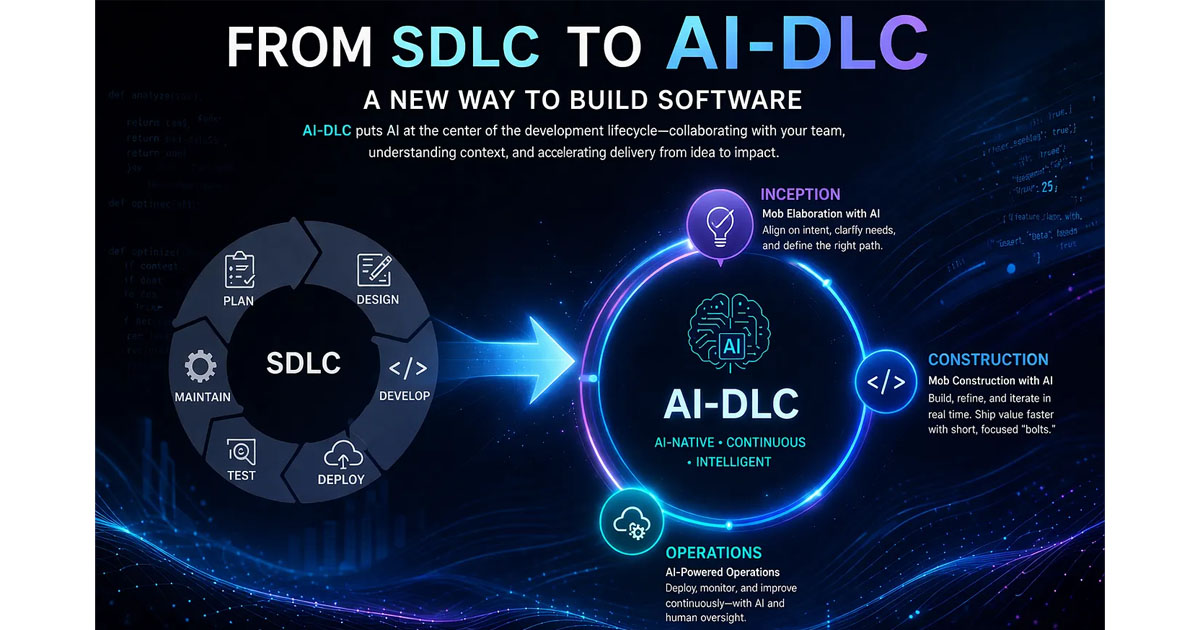
The AI-Driven Development Life Cycle (AI-DLC) is an AI-native methodology built around a simple but powerful idea: AI should be a central collaborator, not a marginal tool.
It operates on two dimensions:
- AI-powered execution with human oversight: AI creates plans, asks clarifying questions, and only acts after human validation
- Dynamic team collaboration: instead of isolated work, teams come together — in person/virtually — in real time to guide AI through decisions that require business judgment
This isn’t AI replacing developers. It’s AI handling the heavy lifting so developers can focus on what actually matters: judgment, creativity, and business impact.
It works for both greenfield and brownfields
How It Works: Three Phases
1. Inception — Mob Elaboration
Everyone in the room: developers, QA, business analysts, product managers, operations. AI guides the team through intent, surfaces questions, and transforms business goals into requirements, stories, and workflows.
Nothing moves to construction until the team has validated the context. Every approval is a checkpoint — push back, refine, then proceed.
2. Construction — Mob Construction
With validated context from inception, AI proposes architecture, domain models, and code. The team provides real-time clarification on technical and architectural decisions.
Developers move up the value chain — from writing code to shaping outcomes. Traditional sprints are replaced by “bolts”: shorter, more intense cycles measured in hours or days, not weeks.
3. Operations
AI applies the accumulated context from previous phases to manage infrastructure as code, deployments, monitoring, and incident response — with team oversight throughout.
Each phase feeds the next, giving AI increasingly informed context to work with.
Handling Real-World Complexity
Large Codebases
Context windows have limits. Models can’t see an entire codebase at once. AI-DLC addresses this through call graphs, which are high-fidelity semantic representations of business transactions that expose cross-system connections invisible at the symbol level. This allows AI to reason about where changes belong without needing to load everything at once.
Standards and Compliance
Design guidelines, security requirements, and regulatory constraints are encoded into steering files, making your organization’s standards available to AI consistently in context, across every project. These rules travel with the codebase, not the developer.
Walkthrough: Building a Feature Flag Management System
Let’s make this concrete. Here’s what AI-DLC looks like end-to-end using a real prompt.
Setup: Before You Start
Before submitting any prompt, you need to wire up the AI-DLC workflow rules into your project.
- Create a fresh project directory
- Download the latest rules from github.com/awslabs/aidlc-workflows/releases/latest
- Extract and copy the rules into the project:
macOS / Linux:
mkdir -p .kiro/steering
cp -r ~/Downloads/aidlc-rules/aws-aidlc-rules .kiro/steering/
cp -r ~/Downloads/aidlc-rules/aws-aidlc-rule-details .kiro/
Windows:
mkdir .kiro\steering
xcopy %USERPROFILE%\Downloads\aidlc-rules\aws-aidlc-rules .kiro\steering\aws-aidlc-rules\ /E /I
xcopy %USERPROFILE%\Downloads\aidlc-rules\aws-aidlc-rule-details .kiro\aws-aidlc-rule-details\ /E /I
Once the rules are in place, open the project in Kiro — and you’re ready.
For this example, I used Kiro in vibe mode to submit the request, with Claude Sonnet 4.6 as the model. Claude Opus 4 is recommended for the best results. You can establish this setup in any AI IDE — not limited to Kiro. Claude Code CLI is a great option — not limited to the Chat interface.
When using it with the chat interface, make sure to work in the Vibe mode (avoid planning or spec-coding modes) to use AI-DLC.
Demo prompt: "Using AI-DLC, build a feature flag management system"
Step 1 — Prompt submitted, requirements loading begins
After submitting the prompt, AI-DLC initializes and begins loading its workflow rules and steering files. It detects the workspace context before doing anything else.

Step 2 — Workspace detection
AI-DLC scans the workspace to understand the existing structure — tech stack, folder layout, and any existing conventions. This context shapes everything that follows.

Step 3 — Phase progress tracking
AI-DLC surfaces a clear view of where you are in the lifecycle. Each phase — Inception, Construction, Operations — is tracked, so the team always knows what’s been validated and what’s next.
Throughout this and all subsequent phases, inputs and decisions are documented in separate, focused files — making it easy to retrieve the right context when needed without overwhelming the agent with a massive amount of information at once.

Step 4 — Clarification document generated
Before writing a single line of code, AI generates a structured set of clarifying questions. These are saved to a docs folder in the repository and presented to the team for review. This is the core of Mob Elaboration — AI surfaces what it doesn’t know, and humans fill the gaps.
Example questions for the feature flag system might include:
- Should flags support percentage-based rollouts or just on/off?
- Is there a need for user-segment targeting?
- What’s the expected scale — hundreds of flags or thousands?

Step 5 — Team reviews answers, approves to continue
Once the team has answered the clarification questions, AI-DLC presents a summary for review. The team approves — or pushes back and refines — before AI proceeds to the next phase. Nothing moves forward without explicit sign-off.

Step 6 — Architecture diagram generated
With validated requirements in hand, AI generates a visual diagram of the system architecture — components, relationships, data flows. The team reviews this before any code is written.

Step 7 — Steering files and generated artifacts are organized
AI-DLC maintains a clean, structured file layout. Steering files (standards, rules, conventions) sit alongside generated artifacts — requirements docs, design decisions, stories. Everything is traceable.

Step 8 — Inception phase complete, approve to move to Construction
The Inception phase wraps up with a final approval gate. The team confirms that requirements, architecture, and stories are aligned before AI-DLC transitions into the Construction phase.

Step 9 — Code generation complete
Construction phase completes with all units implemented. AI has generated the feature flag management system — code, tests, and structure — grounded in everything validated during Inception.

The full cycle — from a single prompt to a working, validated system — without skipping the human checkpoints that make the output trustworthy.
Why It Matters
The promise of AI in software development has always been velocity without sacrificing quality. AI-DLC delivers on that by keeping humans in the decisions that require judgment, while letting AI handle the execution that doesn’t.
Teams that adopt it aren’t just moving faster. They’re building with more clarity, more traceability, and more alignment between what the business needs and what gets shipped.
The methodology is here. The tooling exists. Get started via the aidlc-workflows repo — the latest release (v0.1.7) is a solid starting point.
The question is whether teams are ready to stop retrofitting AI into old processes and start building around it instead.
References
- AI-Driven Development Life Cycle — AWS DevOps Blog
- aidlc-workflows GitHub repository — workflow rules and steering files; a starting point that can be extended with project-specific requirements, compliance mandates, or team conventions
- aidlc-workflows v0.1.7 release
Author
Noor Sabahi | Senior AI & Cloud Engineer | AWS Ambassador
#AI-DLC #DevelopmentLifeCycle #AWS #Innovation #Kiro #AgenticAI #AIAppDevelopment #AIProductivity